
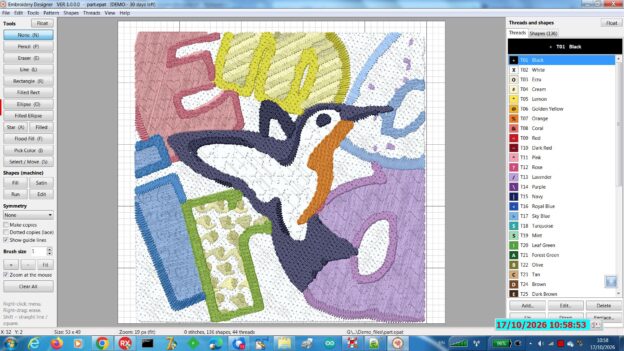
Design cross-stitch charts and machine embroidery on your Windows PC. Draw it, generate it, or turn a photo into stitches, then print the chart or send it to your embroidery machine.
What you can do
- Draw stitch by stitch: pencil, lines, rectangles, ellipses, stars, and flood fill.
- Symmetry: mirrors, turns, and kaleidoscopes, up to 12 copies. Great for mandalas and borders.
- Generate Pattern: 18 kinds of ready-made designs, every one different and ready to edit.
- Photo to cross-stitch: turn any picture into a chart with up to 64 thread colors.
- Thread charts: Brother, Janome, and Husqvarna Viking.
- Machine embroidery: fill, satin, and running-stitch shapes, 10 pattern fills, turning satin and a realistic thread view.
- Lettering: any Windows font, including Hebrew, straight or on an arc.
- Auto-Digitize: a picture becomes machine shapes, ready to fine-tune.
- Tracing picture: put a picture under your design, move and resize it, and trace over it.
- Sew-out simulator: watch the design sew on screen before your machine does.
- Print charts with symbols and a color key, or save them as PDF.
- Machine formats: DST, PES, PEC, JEF, EXP, VP3, XXX, U01.
Requirements
Windows 7, 8, 10, or 11. 32-bit version.
YouTube https://youtu.be/z4MqEL_IiT4
Free 30-day demo
Download, install, and start designing. Full help and a PDF manual are included.